
Tokens and suggestions
When your tokens run low
 Michael Ishoel OlsenFounding engineer0:40Recorded 22 de novembro de 2026

Nativean tells you before your tokens run out. At zero, work that costs tokens waits for your monthly refill, unless a workspace owner or admin adds a token pack or moves to a bigger plan. Your assistant, your suggestions and everything free keep working.
In this video
Step by step
Step 1: Ask your assistant
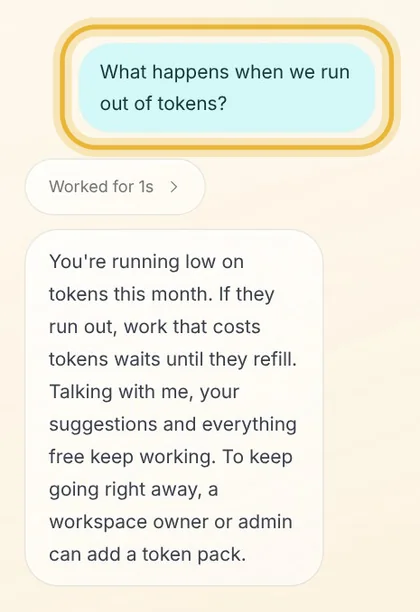
Ask your assistant, like “What happens when we run out of tokens?”. It checks your workspace's tokens and tells you where you stand.
Step 2: Nativean tells you
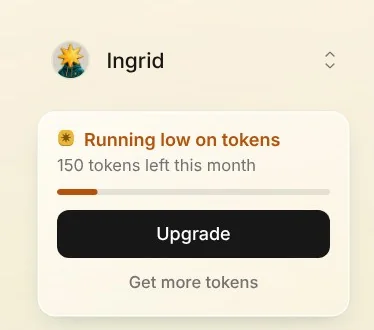
When a fifth of the month's tokens is left, a card in the sidebar says you're running low, with how many are left. When you're almost out, a bar at the top of the app says so too.
Step 3: At zero
At zero, work that costs tokens waits until your tokens refill on your plan's day each month. Nativean shows Out of tokens with the day they come back. Your assistant keeps talking with you, your deck and Autopilot keep making posts while you have suggestions, and the step-by-step wizards and Memory's chat keep working.

Step 4: A token pack
To keep going now, a workspace owner or admin can buy a token pack, paid on Stripe's secure page. Pack tokens never expire, and Nativean uses them only once the month's tokens run out.

Step 5: A bigger plan
Or move to a bigger plan, for more tokens every month. Already on Max? Press Talk to us in the dialog to find a plan that fits. Each brand past the ones your plan includes adds tokens to the workspace too.
Tips from Michael
- Not an owner or admin? Nativean asks you to ask one of them to add tokens.
- On an Enterprise plan, your tokens are set in your agreement.
Try it in Native
New to Native? Start with your website, and see your first posts today.