
Annonser
Pause your ads or change the budget
 Trond HaugåCOO og medgründer0:36Spilt inn 19. november 2026

Your assistant changes your campaigns on Meta for you: what they spend each day, and whether they run. Every change waits for your yes, then goes straight to Meta.
I denne videoen
Steg for steg
Steg 1: Ask your assistant
In the chat beside the page, say the new daily budget, like “Lower our ad budget to 100 kr a day.” With more than one campaign, name the one you mean.

Steg 2: Check it, then approve
The card shows the daily budget before and after, and the most a month can cost. Press Approve.
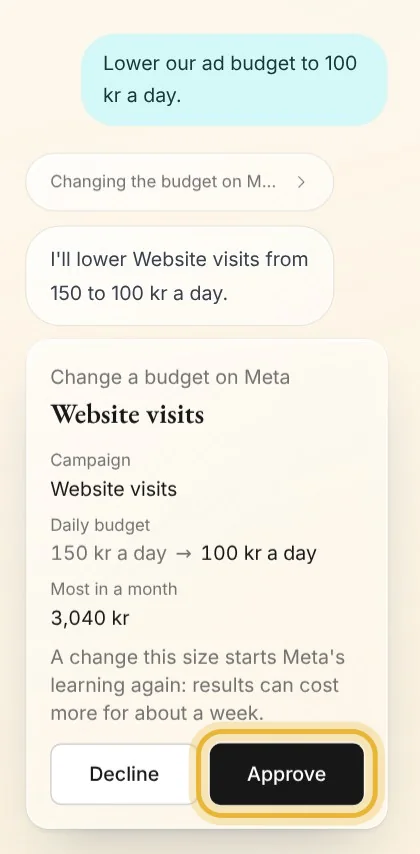
Tips: Change it by more than 30 percent, and Meta starts learning again, so results can cost more for about a week. The card says so.
Steg 3: See the new budget
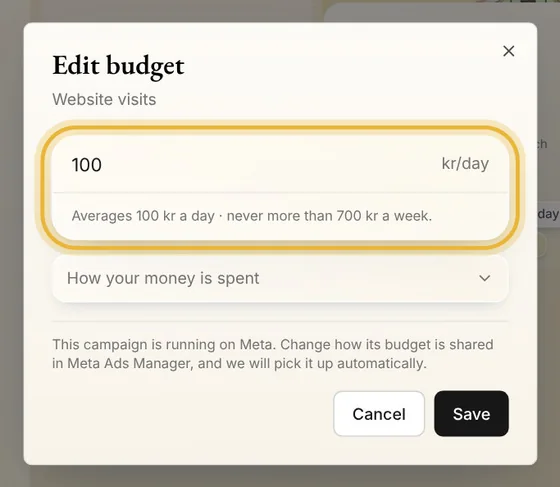
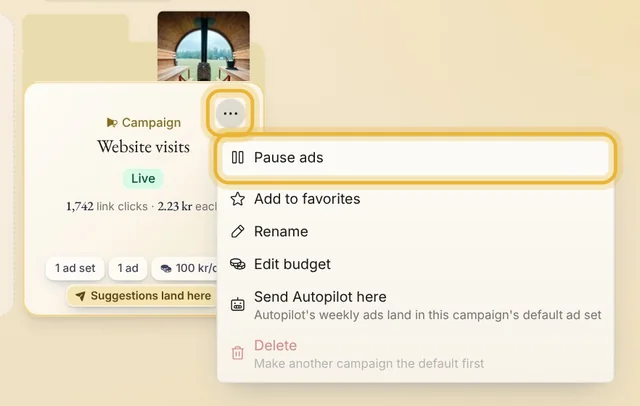
In Creations, pick Campaigns, and press the three dots on your campaign. Edit budget shows the new budget, and you can change it there yourself.
Steg 4: Pause your ads
To stop your ads for a while, ask your assistant to pause them, and approve, or press Pause ads in the same menu and confirm. Nothing spends while they're paused, and your ads are kept. Ask again when you want them back.
Tips: A campaign you made in Meta Ads Manager is switched back on there, not here.
Prøv det i Native
Ny i Native? Start med nettsiden din, og se de første innleggene dine i dag.