Tokens and suggestions
What's free, and what costs tokens
 Michael Ishoel OlsenFounding engineer0:35Recorded October 29, 2026
A lot of Native is free. Making a post, an ad or a design step by step costs nothing, and neither does Memory's chat. When something does cost tokens, most buttons show the price before you click.
In this video
Step by step
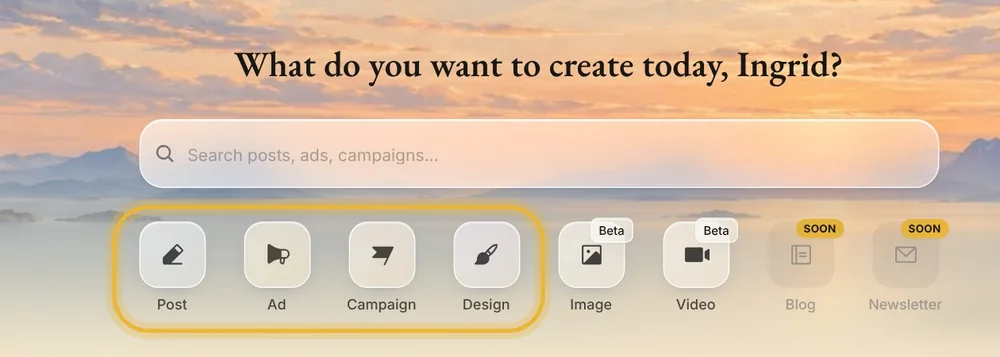
Step 1: Free: step by step
In Create, Post, Ad and Design walk you through a post, an ad or a design one question at a time, and that's free. So are Memory's chat, research and learning.
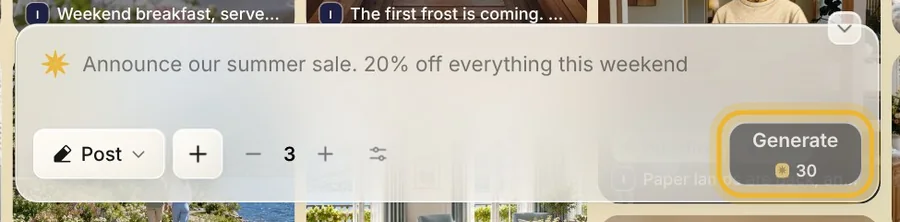
Step 2: Prices on the buttons
When something costs tokens, most buttons show the price before you click. Generate in Create's box shows the price of the posts you ask for, and it changes as you ask for more.
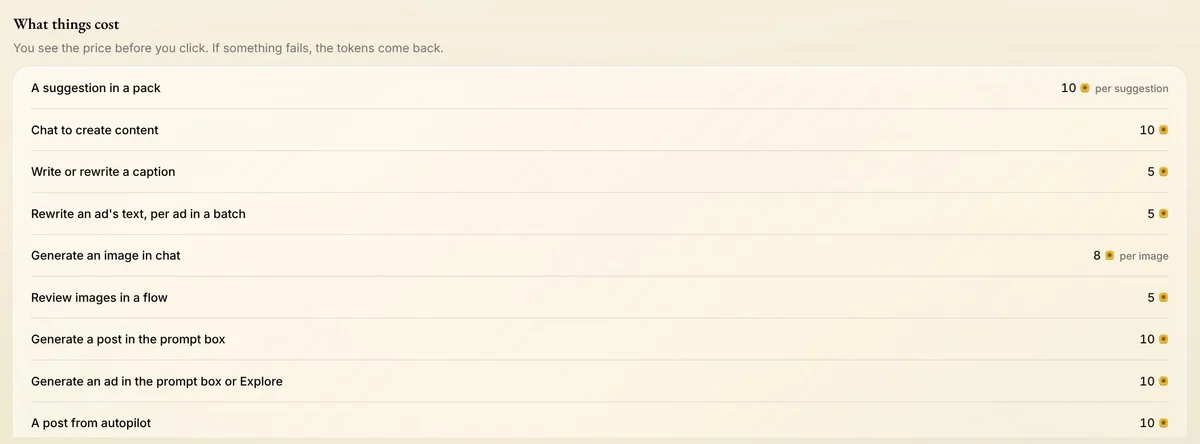
Step 3: What things cost
Open your menu and press Native tokens. Under Advanced, What things cost lists the prices, and Token activity below it shows where this month's tokens went.
Step 4: Failed work gives tokens back
If something fails and you get nothing from it, the tokens come back. Token activity shows them as given back.
Tips from Michael
- The first five changes to each post or ad card in your deck are free. After that, each shows its price.
- Rewrite in the caption box and Fix caption with AI are free.
- Tokens belong to the whole workspace, so a teammate's work uses them too.
Try it in Native
New to Native? Start with your website, and see your first posts today.